7. Air Quality Modeling (SRW-AQM)
The standard SRW App distribution uses the uncoupled version of the UFS Weather Model (atmosphere-only). However, users have the option to use a coupled version of the SRW App that includes the standard distribution (atmospheric model) plus the Air Quality Model (AQM).
The AQM is a UFS Application that dynamically couples the Community Multiscale Air Quality (CMAQ) model with the UFS Weather Model (WM) through the NUOPC Layer to simulate temporal and spatial variations of atmospheric compositions (e.g., ozone and aerosol compositions). The CMAQ model, treated as a column chemistry model, updates concentrations of chemical species (e.g., ozone and aerosol compositions) at each integration time step. The transport terms (e.g., advection and diffusion) of all chemical species are handled by the UFS WM as tracers.
Note
Although this chapter is the primary documentation resource for running the AQM configuration, users may need to refer to Chapter 4 and Chapter 5 for additional information on building and running the SRW App, respectively.
Attention
These instructions should work smoothly on Hera and WCOSS2, but users on other systems may need to make additional adjustments.
7.1. Quick Start Guide (SRW-AQM)
7.1.1. Download the Code
Clone the develop branch of the authoritative SRW App repository:
git clone -b develop https://github.com/ufs-community/ufs-srweather-app
cd ufs-srweather-app
7.1.2. Checkout Externals
Users must run the checkout_externals script to collect (or “check out”) the individual components of the SRW App (AQM version) from their respective GitHub repositories.
./manage_externals/checkout_externals
7.1.3. Build the SRW App with AQM
On Hera and WCOSS2, users can build the SRW App AQM binaries with the following command:
./devbuild.sh -p=<machine> -a=ATMAQ
where <machine> is hera, or wcoss2. The -a argument indicates the configuration/version of the application to build.
Building the SRW App with AQM on other machines, including other Level 1 platforms, is not currently guaranteed to work, and users may have to make adjustments to the modulefiles for their system.
7.1.4. Load the workflow_tools Environment
Load the python environment for the workflow:
# On WCOSS2 (do not run on other systems):
source ../versions/run.ver.wcoss2
# On all systems (including WCOSS2):
module use /path/to/ufs-srweather-app/modulefiles
module load wflow_<machine>
where <machine> is hera or wcoss2. The workflow should load on other platforms listed under the MACHINE variable in Section 11.1, but users may need to adjust other elements of the process when running on those platforms.
If the console outputs a message, the user should run the commands specified in the message. For example, if the output says:
Please do the following to activate conda:
    > conda activate workflow_tools
then the user should run conda activate workflow_tools. Otherwise, the user can continue with configuring the workflow.
7.1.5. Configure and Experiment
Users will need to configure their experiment by setting parameters in the config.yaml file. To start, users can copy a default experiment setting into config.yaml:
cd ush
cp config.aqm.community.yaml config.yaml
Users may prefer to copy the config.aqm.nco.realtime.yaml for a default “nco” mode experiment instead.
Users will need to change the MACHINE and ACCOUNT variables in config.yaml to match their system. They may also wish to adjust other experiment settings. For more information on each task and variable, see Chapter 11.
Users may also wish to change cron-related parameters in config.yaml. In the config.aqm.community.yaml file, which was copied into config.yaml, cron is used for automatic submission and resubmission of the workflow:
workflow:
  USE_CRON_TO_RELAUNCH: true
  CRON_RELAUNCH_INTVL_MNTS: 3
This means that cron will submit the launch script every 3 minutes. Users may choose not to submit using cron or to submit at a different frequency. Note that users should create a crontab by running crontab -e the first time they use cron.
7.1.7. Run the Workflow
If USE_CRON_TO_RELAUNCH is set to true in config.yaml (see Section 7.1.5), the workflow will run automatically. If it was set to false, users must submit the workflow manually from the experiment directory:
cd <EXPT_BASEDIR>/<EXPT_SUBDIR>
./launch_FV3LAM_wflow.sh
Repeat the launch command regularly until a SUCCESS or FAILURE message appears on the terminal window. See Section 11.3.2 for more on the <EXPT_BASEDIR> and <EXPT_SUBDIR> variables.
Users may check experiment status from the experiment directory with either of the following commands:
# Check the experiment status (best for cron jobs)
rocotostat -w FV3LAM_wflow.xml -d FV3LAM_wflow.db -v 10

# Check the experiment status and relaunch the workflow (for manual jobs)
./launch_FV3LAM_wflow.sh; tail -n 40 log.launch_FV3LAM_wflow
7.2. WE2E Test for AQM
Build the app for AQM:
./devbuild.sh -p=hera -a=ATMAQ
Add the WE2E test for AQM to the list file:
echo "custom_ESGgrid" > my_tests.txt
echo "aqm_grid_AQM_NA13km_suite_GFS_v16" >> my_tests.txt
Run the WE2E test:
$ ./run_WE2E_tests.py -t my_tests.txt -m hera -a gsd-fv3 -q
7.3. Additional Tasks for AQM
7.3.1. Structure of SRW-AQM
The flowchart of the non-DA (data assimilation) SRW-AQM (Air Quality Modeling) is illustrated in Figure 7.1. Compared to the non-coupled (ATM stand-alone) FV3-LAM, SRW-AQM has additional tasks for pre- and post-processing. For pre-processing, multiple emission data such as NEXUS, fire, and point-source emission are retrieved or created for air quality modeling. Moreover, the chemical initial conditions (ICs) are extracted from the restart files of the previous cycle and added to the existing IC files. The chemical lateral boundary conditions (LBCs) and the GEFS aerosol data are also adeded to the existing LBC files. For post-processing, air quality forecast products for O3 and PM2.5 are generated and the bias-correction technique is applied to improve the accuracy of the results.
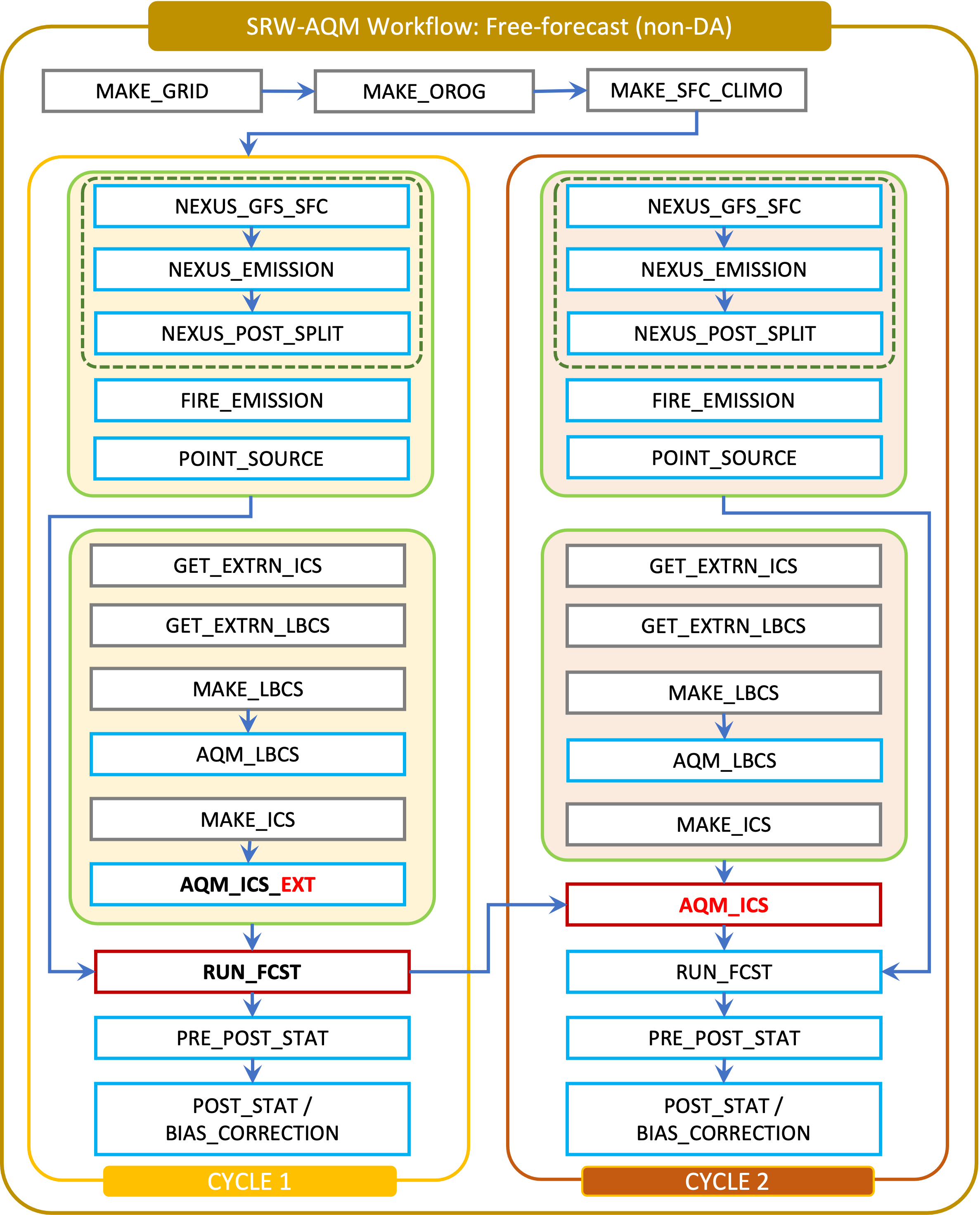
Fig. 7.1 Workflow structure of SRW-AQM (non-DA)
7.3.2. Pre-processing Tasks of SRW-AQM
The pre-processing tasks for air quality modeling (AQM) are shown in Table 7.1.
Task name |
Description |
|---|---|
nexus_gfs_sfc |
This task retrieves the GFS surface files from the previous cycle in NRT (Near-Real-Time) or current cycle in retrospective cases. The surface radiation, soil moisture and temperature fields are needed for the MEGAN biogenics emissions within nexus_emission. |
nexus_emission |
This task prepares the run directory with gridded emission inputs, run nexus to create model ready emission for the given simulation day, and post processes nexus output to make it more readable. The task will also split the task into multiple jobs set by the user. |
nexus_post_split |
This task combines the nexus_emission outputs into a single job. |
fire_emission |
This tasks is used to convert both satellite-retrieved gas and aerosol species emissions (RAVE) from mass (kg) to emission rates (kg/m2/s) and create 3-day hourly model-ready fire emission input files. |
point_source |
This task aggregates the anthropogenic point source sectors of the National Emission Inventory(NEI) into a ready-to-input point-source emission file based on the weekday/weekend/holiday patterns of each sector and date/time of the simulation. |
aqm_ics |
This task creates a chemical initial condition file by using the previous cycle restart files. |
aqm_lbcs |
This task adds the chemical lateral boundary condition (LBC) upon the meteorological lateral boundary condition to form the full-set ready-to-input LBC for the simulation. It includes two sub-tasks: the gaseous species LBC and dynamic aerosol LBC. The former adds static gaseous LBC using monthly mean global data. The latter is the parallel job, which extracts the GEFS-Aerosol Model’s output along the regional domain, and performs the species conversion from GOCART aerosols to CMAQ aerosols. |
7.3.3. Post-processing Tasks of SRW-AQM
The post-processing tasks for air quality modeling (AQM) are shown in Table 7.2. Since the module required to run these tasks is available only on WCOSS2, these tasks should not be defined in the configuration file config.yaml on other platforms.
Task name |
Description |
|---|---|
pre_post_stat |
This task creates surface (i.e., model 1st level) meteorological and chemical files to support air quality product generation and generate training data to support bias correction tasks. |
post_stat_o3 |
This task generates air quality forecast products including hourly -average and statistical products for O3 (e.g., daily 8-hour average maximum O3). |
post_stat_pm25 |
This task generates air quality forecast products including hourly -average and statistical products for PM2.5 (e.g., 24-hour average PM2.5). |
bias_correction_o3 |
This task applies a bias-correction technique (e.g., analog ensemble) to improve model raw forecast for O3 and generates the bias-corrected O3 products. |
bias_correction_pm25 |
This task applies a bias-correction technique (e.g., analog ensemble) to improve model raw forecast for PM2.5 and generates the bias-corrected PM2.5 products. |